
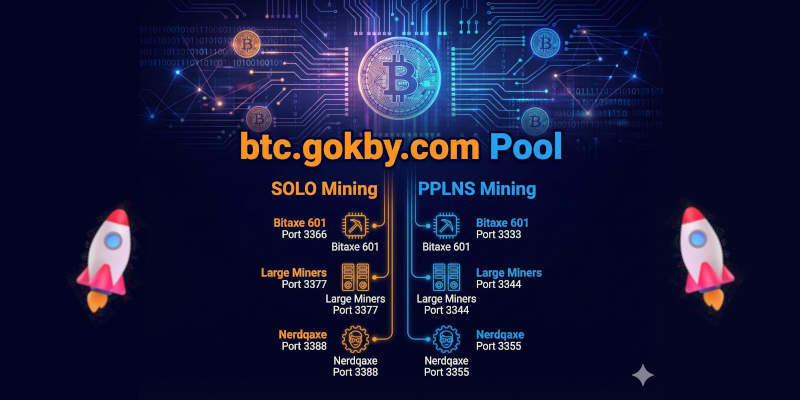
The btc.gokby.com stratum+tcp and Port Guide; The world of Bitcoin mining has evolved from industrial-scale farms back to the desktop, thanks to the rise of "lottery miners" and efficient home-scale ASIC hardware. One of the platforms facilitating this is btc.gokby.com, a pool that caters specifically to specialized hardware like the Bitaxe and Nerdqaxe.
Whether you are looking for a steady stream of Satoshis or aiming for the "jackpot" of a full block reward, selecting the right port is critical for your miner's performance.
Understanding the Mining Modes: SOLO vs. PPLNS
Before choosing your port, you must decide on your payout strategy.
1. SOLO Mining (The Lottery)
In SOLO mode, you are not sharing rewards. If your miner (even a small Bitaxe) finds a valid block, you receive the entire block reward (currently 3.125 BTC plus fees). However, the probability is extremely low—hence the term "Lottery Mining."
2. PPLNS (Pay Per Last N Shares)
PPLNS is the standard for miners seeking consistency.The pool combines the power of all connected miners.When the pool finds a block, the reward is distributed proportionally based on the work (shares) you contributed during a specific window. This is ideal for those who want to see their balance grow daily.
The world of Bitcoin mining has evolved from industrial-scale farms back to the desktop, thanks to the rise of "lottery miners" and efficient home-scale ASIC hardware. One of the platforms facilitating this is btc.gokby.com, a pool that caters specifically to specialized hardware like the Bitaxe and Nerdqaxe.
Whether you are looking for a steady stream of Satoshis or aiming for the "jackpot" of a full block reward, selecting the right port is critical for your miner's performance.
The btc.gokby.com Port Guide
The pool utilizes the Stratum protocol, the industry standard for communication between your hardware and the server.
Stratum Host: stratum+tcp://btc.gokby.com or for SSL stratum+ssl://btc.gokby.com
SSL Configuration for SOLO Mining
Target Hardware | Port | Description |
Bitaxe 601 | 6611 | Optimized difficulty for the single-chip Bitaxe 601. |
Large Miners | 6615 | High-difficulty port designed for S19s, S21s, or larger ASIC rigs. |
Nerdqaxe | 6613 | Tailored for the multi-chip Nerdqaxe setup. |
SSL Configuration for PPLNS Mining
Target Hardware | Port | Description |
Bitaxe 601 | 6621 | Low-latency port for consistent share submission on Bitaxe 601. |
Large Miners | 6625 | High-bandwidth port to handle the massive hashrate of industrial ASICs. |
Nerdqaxe | 6623 | Balanced difficulty for the Nerdqaxe series. |
Hardware Focus: Why the Port Matters
Choosing the wrong port can lead to stale shares or unnecessary hardware strain.
Bitaxe 601: As a compact, open-source miner, the Bitaxe 601 requires a lower "starting difficulty." Using a port meant for large miners (like 3375 for SSL 3376) might cause your device to struggle to find any shares at all.
Nerdqaxe: Typically featuring multiple BM1366 or BM1370 chips, the Nerdqaxe sits in the "middle ground." Ports 3388 and for SSL 3389 ensure that the work templates sent by the pool match the device's higher hashrate compared to a standard Bitaxe.
Large Miners: Industrial ASICs produce trillions of hashes per second. If they use a "low difficulty" ports, Ports 3366 and for SSL 3367 they will flood the pool with too many shares, leading to network congestion and potential rejection.
How to Set Up Your Miner
To begin mining on btc.gokby.com, follow these standard configuration steps on your device's web interface:
URL/Host:
stratum+tcp://btc.gokby.com:PORT(ReplacePORTwith your chosen number from the tables above).User:
Your_Bitcoin_Wallet_Address.WorkerName(TheWorkerNamecan be anything, e.g.,MyBitaxe).Password: Usually
xor123. (or anything, not used or example for bitaxe 601 "d=1500" or a static maxDifficulty value that suits you "d=?")
Pro Tip: If you are solo mining, ensure your Bitcoin address is correct. There is no "pool balance" to withdraw; the reward goes directly to the address provided if you hit a block.

